Overview
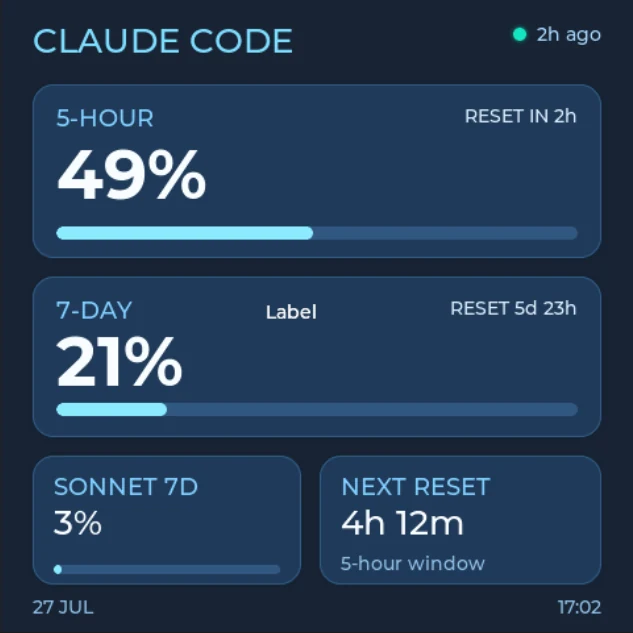
The Claude Code Token Tracker is a compact free LVGL dashboard template for a 480 x 480 display. It presents Claude Code usage windows, reset timing, and last-updated information in a simple square layout that can work well on a small desk display or embedded status panel.
The screen uses large percentages and horizontal progress bars for the main five-hour and seven-day limits. Two smaller cards show Sonnet usage and the next reset, while the top-right status dot and timestamp communicate data freshness. The supplied values are static examples and are not connected to Claude Code or an Anthropic account.
What's included
- One 480 x 480 LVGL screen for square embedded displays.
- Five-hour usage card, showing
49%, a progress bar, and reset timing. - Seven-day usage card, showing
21%, a progress bar, and a longer reset window. - Sonnet seven-day card, with its own percentage and compact progress bar.
- Next-reset card, showing the remaining time and window type.
- Last-updated indicator, using a green status dot and relative timestamp.
- Date and time footer, keeping basic update context visible.
- Four converted Montserrat font assets for the dashboard hierarchy.
The project contains no local images, animated images, icons, colors, or components. It also has no configured events or animations, keeping the design small and easy to adapt.
Layout and assets
The visual hierarchy is intentionally direct. CLAUDE CODE identifies the provider, then the two largest cards carry the usage windows most likely to need attention. Cyan progress fills sit on muted blue tracks, and large white percentages remain readable against the dark navy cards.
The smaller bottom cards preserve the same rounded geometry while using less space. This lets the dashboard add supporting information without competing with the five-hour and seven-day totals.
The four included LVGL font assets are:
Claude Tracker Montserrat Bold 52 700Claude Tracker Montserrat Medium 14 500Fan UI Montserrat Medium 18 500Fan UI Montserrat Medium 26 500
These sizes cover large percentage values, section titles, reset details, and footer text without requiring image-based lettering.
Why it works well for LVGL
The design is built from ordinary LVGL-friendly objects: containers for the cards, labels for changing values, and bars for usage progress. That makes the important data easy to update after export.
- Bars can receive live percentage values without regenerating graphics.
- Labels keep percentages and reset captions editable from firmware.
- The square canvas has a clear fixed target for 480 x 480 panels.
- No image assets are required, keeping the visual structure lightweight.
- A small status dot can communicate freshness, connectivity, or stale data.
A real implementation should distinguish loading, current, stale, disconnected, and error states. Do not leave an old value looking live if the data source stops updating.
Connecting usage data
After export, connect the bars and labels to a separate presentation layer. A local companion service could collect approved usage information, normalize it, and send display-ready values to the device. Keep account credentials and provider access outside the generated UI code.
An LVGL update can be as small as:
static void tracker_set_five_hour(int percent, const char * reset_text)
{
    lv_bar_set_value(ui_five_hour_progress, percent, LV_ANIM_OFF);
    lv_label_set_text_fmt(ui_five_hour_usage, "%d%%", percent);
    lv_label_set_text(ui_five_hour_reset, reset_text);
}
This is only an illustrative UI pattern. The template itself does not include Claude authentication, usage collection, networking, or automatic refresh behavior.
Customizing the template
- Replace the sample percentages and reset times with verified values from your data source.
- Rename the visible placeholder
Labelto the plan, model, or limit description you need. - Change the status dot when data becomes stale or unavailable.
- Add a second provider only if the square screen can retain readable text; for a full Claude and Codex comparison, use the wider AI Token Monitor template.
- Adjust the cyan palette and card borders to match your hardware enclosure or product theme.
- Rename the important objects before export so the generated C references are easy to identify.
Exporting and best uses
Open the project in PicoPixel, customize the sample labels, and confirm that 480 x 480 matches the target panel. Export the project as LVGL C, then connect the three progress bars and their labels to your application state.
For the import steps, see How to use PicoPixel templates. The template is a useful starting point for Claude Code desk displays, developer status panels, square ESP32 dashboards, reset-window indicators, and simple LVGL progress-bar examples.