ओवरव्यू
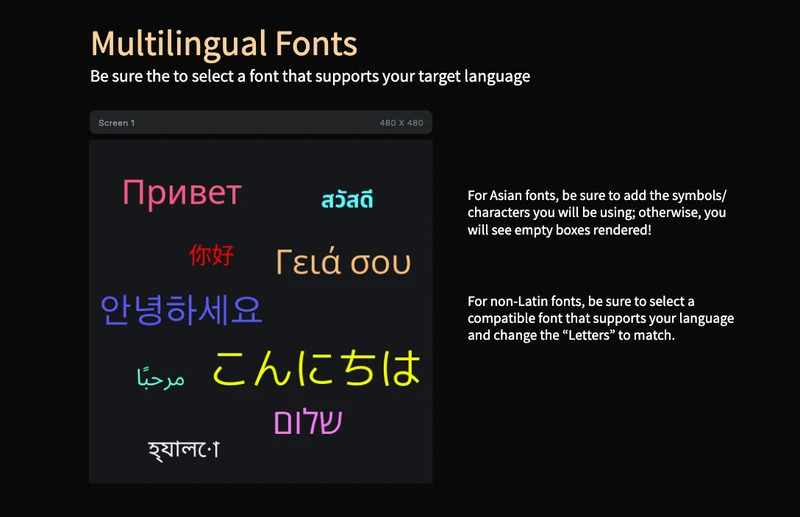
क्या आप embedded UI के लिए मुफ्त LVGL fonts template या multilingual text example ढूंढ रहे हैं? यह PicoPixel project दिखाता है कि converted LVGL fonts, script-specific font choices, sizes और colors 480 x 480 screen पर कैसे साथ आते हैं।
Template एक ही जगह कई non-Latin writing systems दिखाता है, जिनमें Cyrillic, Chinese, Japanese, Greek, Arabic, Korean, Hebrew, Thai और Bengali शामिल हैं। इसे तब starting point की तरह इस्तेमाल करें जब आपको ESP32 dashboard, settings screen, kiosk UI, wearable menu या smart-device interface चाहिए जिसे केवल English text नहीं, translated labels display करने हों।
मुख्य lesson simple है: LVGL fonts desktop web fonts जैसे नहीं होते। Converted LVGL font में वही glyphs और sizes होते हैं जिन्हें आप चुनते हैं। Chinese, Japanese और Korean के लिए आम तौर पर आपको केवल वही exact characters include करने चाहिए जिन्हें आपकी UI display करेगी, वरना missing characters empty boxes की तरह render हो सकते हैं। Full workflow के लिए PicoPixel guide to working with LVGL fonts देखें।
क्या शामिल है
- 480 x 480 multilingual typography screen, compact font test canvas की तरह designed।
- Nine visible text examples, Cyrillic, Chinese, Japanese, Greek, Arabic, Korean, Hebrew, Thai और Bengali cover करते हुए।
- Script-specific label layers, layer panel में named, ताकि यह देखना आसान हो कि कौन सा text object किस language से belongs करता है।
- Ten converted font assets, जो दिखाते हैं कि real LVGL project को कई font families और sizes की जरूरत हो सकती है।
- No image dependency, इसलिए project bitmap screenshots के बजाय text rendering पर focused है।
- Mixed font sizes, जिनमें small body-style labels और larger display text शामिल हैं।
- Mixed colors, जिससे dark background पर हर script inspect करना आसान है।
- In-canvas font reminders, दो बड़े rules call out करते हुए: ऐसी font चुनें जो आपकी target language support करे, और वे characters include करें जिन्हें आपकी UI सच में use करती है।
- Create Font panel example, bundled fonts, uploads, font size presets,
Letters,Asianऔर advanced options दिखाते हुए।
एसेट झलक
Assets panel इसे font-focused PicoPixel template की तरह दिखाता है:
- Images:
0, preview editable text objects से बना है। - Colors:
0, colors design में labels पर directly apply किए गए हैं। - Fonts:
10, multiple scripts, sizes और font families demonstrate करने के लिए enough। - Widgets:
0, जिससे example text और font assets पर focused रहता है।
Visible font assets में शामिल हैं:
Gothic A1 48M PLUS 1p 60Noto Sans Arabic 32Noto Sans Bengali 32Noto Sans Cyrillic 48Noto Sans SC 32Noto Sans Thai Bold 32Open Sans Greek 48Open Sans Hebrew 48
Screenshot में list scrollable है, इसलिए project visible rows से एक और font asset contain करता है। Important pattern यह है कि हर script ऐसी font use करती है जिसमें उसके required glyphs सच में मौजूद हैं।
लेयर संरचना
Layer panel language checklist की तरह setup है। Screen 1 के नीचे, हर label उस script या language के नाम पर named है जिसे वह demonstrate करता है:
Cyrillic - RUChineseJapaneseGreekArabicKoreanHebrewThai-naBengali
यह structure file को reference के रूप में useful बनाता है। अगर कोई language सही render होती है, तो आप label, font asset, size, color और text value inspect कर सकते हैं, फिर वही approach अपने PicoPixel project में copy कर सकते हैं।
CJK फ़ॉन्ट और गायब ग्लिफ़
Chinese, Japanese और Korean fonts को LVGL में special care चाहिए क्योंकि full character sets बहुत बड़े होते हैं। हर possible glyph include करने से embedded project में megabytes add हो सकते हैं, जो small devices के लिए आम तौर पर बहुत ज्यादा है।
CJK text के लिए PicoPixel के Create Font panel में Asian option use करें, फिर Symbols field में exact characters add करें जिन्हें आपकी interface display करेगी। हर label, button, menu item, warning message, unit और status string include करें जो screen पर appear हो सकती है।
अगर आपकी UI बाद में ऐसा Chinese, Japanese या Korean character display करती है जो font बनाते समय include नहीं था, तो LVGL character की जगह empty box render कर सकता है। जब translated text बदलता है, Symbols field update करें और font recreate करें।
Detailed walkthrough Working with fonts में है, खासकर Chinese, Japanese और Korean वाले section में।
हर स्क्रिप्ट के लिए फ़ॉन्ट चुनना
हर font हर language support नहीं करती। Latin font English के लिए perfect दिख सकती है लेकिन उसमें Arabic, Hebrew, Thai, Korean, Japanese या Chinese glyphs नहीं हो सकते। Template safer approach दिखाता है: उन font families का इस्तेमाल करें जो उस script के लिए designed हैं जिसे आप render कर रहे हैं।
- Simplified Chinese के लिए
Noto Sans SCया दूसरी CJK-capable font use करें। - Japanese text के लिए Japanese-capable font use करें।
- Korean text के लिए Gothic A1 या दूसरी Hangul font जैसी Korean-capable font use करें।
- Arabic-script text के लिए
Noto Sans Arabicuse करें। - Hebrew के लिए
Open Sans Hebrewया दूसरी Hebrew-capable font use करें। - Greek के लिए Greek-capable font use करें।
- Russian और दूसरे Cyrillic text के लिए Cyrillic-capable font use करें।
- Thai और Bengali labels के लिए Thai और Bengali-capable fonts use करें।
Create Font panel में Letters dropdown Greek, Cyrillic, Hebrew, Arabic, Thai आदि non-CJK script coverage control करता है। Asian dropdown separate है क्योंकि CJK glyph sets बहुत बड़े होते हैं।
Font create करने से पहले font preview field use करें। वही actual UI text paste करें जिसे आप render करना चाहते हैं। अगर preview boxes दिखाता है, export से पहले ऐसी font पर switch करें जो वह language support करती हो।
यह LVGL के लिए क्यों अच्छा है
यह template useful है क्योंकि यह embedded hardware पर LVGL fonts के real behavior से match करता है।
- LVGL fonts converted bitmap assets हैं, इसलिए हर selected size separately generate होती है।
- Only selected glyphs included होते हैं, जिससे firmware size control में रहता है।
- Script-specific fonts missing glyphs कम करते हैं, खासकर non-Latin languages के लिए।
- Multiple sizes coexist कर सकते हैं, इसलिए headings, body labels और small captions हर एक appropriate font asset use कर सकते हैं।
- Labels editable रहते हैं, इसलिए export से पहले आप sample text को अपनी translations से replace कर सकते हैं।
- Project standard LVGL 8.x UI code के रूप में export होता है, जिसमें labels के लिए required font assets शामिल होते हैं।
रनटाइम पैटर्न
Export के बाद भी आपके labels firmware से update किए जा सकते हैं। Exact generated symbol names आपके PicoPixel object names और font names पर depend करते हैं, लेकिन LVGL pattern familiar है:
lv_label_set_text(ui_status_label, "Settings");
lv_obj_set_style_text_font(ui_status_label, &ui_font_noto_sans_32, 0);
Translated text के लिए, यह सुनिश्चित करें कि exported font में हर character हो जिसे आप lv_label_set_text में pass कर सकते हैं। यह CJK strings और उन dynamic status messages के लिए सबसे ज्यादा important है जो initial design canvas पर visible नहीं हैं।
कस्टमाइज़ेशन विचार
इसे मुफ्त LVGL typography template की तरह इस्तेमाल करें, फिर अपने product के लिए adapt करें।
- Sample greetings को अपनी real translated UI labels से replace करें।
- हर script और size के लिए एक font create करें जिसकी आपकी interface को सच में जरूरत है।
- Firmware छोटा रखने के लिए export से पहले unused font sizes reduce करें।
- Font family चुनने से पहले कई font families compare करने के लिए वही text layout use करें।
- Arabic, Persian, Hebrew या दूसरी RTL interfaces के लिए right-to-left labels add करें।
- Language selection, settings, onboarding या alerts के लिए separate translated screens create करें।
- Experiment करने के बाद
Delete Unused Fontsuse करें ताकि केवल referenced font assets रहें।
अपने प्रोजेक्ट में एक्सपोर्ट करना
Template को PicoPixel में खोलें, font assets inspect करें, sample labels को अपने text से replace करें, और export से पहले missing fonts create करें। अगर आप Chinese, Japanese या Korean के साथ काम कर रहे हैं, तो font create करते समय exact UI strings को Symbols field में paste करें।
ESP32 projects के लिए usual flow है:
- वे languages चुनें जिन्हें आपकी UI support करेगी।
- हर script और size के लिए compatible LVGL fonts create करें।
- Chinese, Japanese और Korean के लिए exact characters include करें जिन्हें आपकी UI display करेगी।
- इस template के sample labels को अपने real UI text से replace करें।
- PicoPixel UI को LVGL C के रूप में export करें।
- Exported UI और font files को अपने ESP-IDF, Arduino या PlatformIO project में add करें।
- LVGL और display driver ready होने के बाद
ui_init()call करें।
Step-by-step font workflow के लिए Working with fonts पढ़ें। Templates import और open करने के लिए How to use PicoPixel templates देखें।
सबसे अच्छे उपयोग
यह template तब अच्छा fit है जब आप इनके लिए clear starting point चाहते हैं:
- LVGL multilingual text examples
- Chinese, Japanese या Korean के लिए CJK font setup
- ESP32 translated UI prototypes
- Font conversion testing
- Missing-glyph debugging
- Right-to-left और non-Latin script checks
- International settings screens
- Kiosk, wearable, dashboard और smart-device interfaces